The design-to-code AI workflow you’re looking for doesn’t exist (yet)
It’s not you – there isn’t an end-to-end tool that ticks all the boxes.

Every design team is doing the same thing at the moment: trying to figure out what their process and tooling should be, now that AI can write production-ready code.
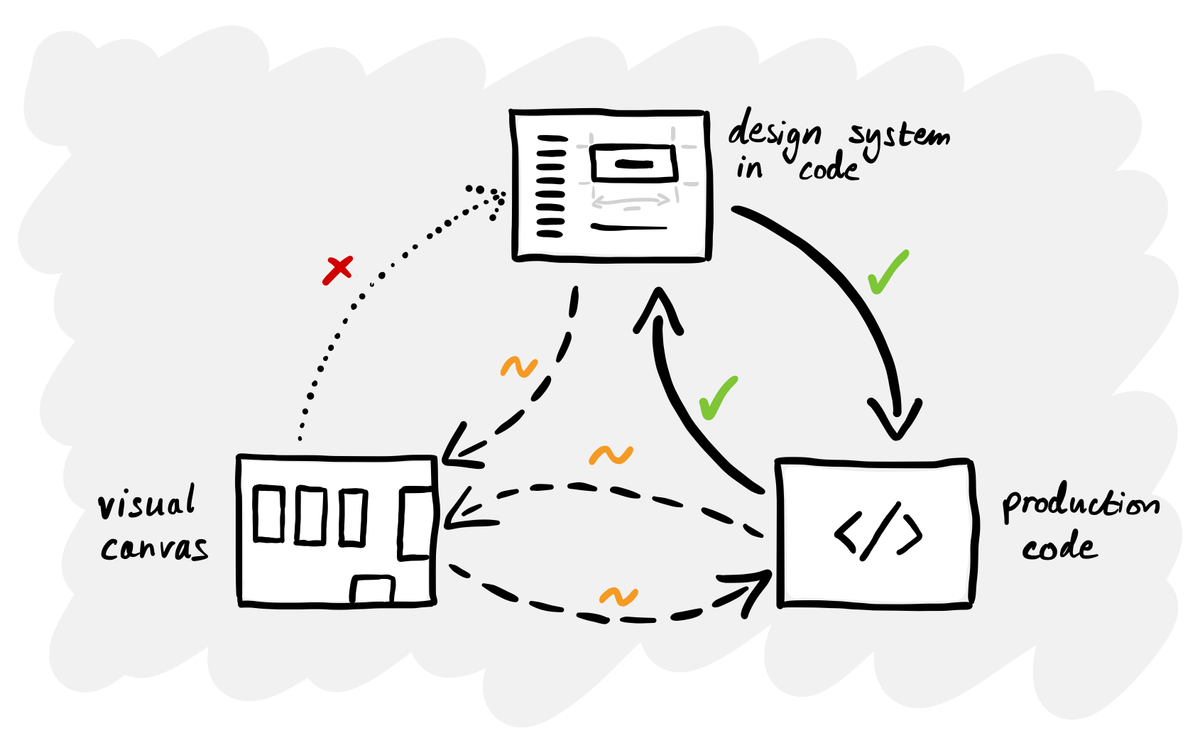
The reality is that there isn’t a satisfying answer. No single tool provides a complete loop between a production code-based design system and a visual design canvas. Designers are having to use an incomplete approach because the tools simply aren’t mature enough yet.
Two approaches, neither complete
Because there’s no established end-to-end process, you see designers gravitating to one end of the spectrum or the other.
One group starts in Figma. They’re experimenting with Make and similar tools, creating prototypes that are interactive but not production code. Some of these prototypes use the design system, but many don’t. These tools are accessible but limited: you quickly reach their limits and there’s still a handover to engineering.
The other group starts in code, using Claude Code or Codex to build production UI directly. At Intercom, all their designers now ship PRs to production using tools like Cursor. They started with CSS and copy fixes and are progressing towards owning the entire frontend, with engineers handling the backend. Working directly with production code is the more progressive approach, but for many non-technical people, there’s a huge learning curve.
These aren’t mutually exclusive. Most people still use a canvas for exploration and code tools for production. The problem is that nothing connects the two ends properly. That’s the gap everyone is trying to close.
What ’solved’ actually looks like
Before getting into what tools can and can’t do today, it’s worth defining what the ideal workflow would need to cover. Here are ten requirements I came up with:
- Import a code-based design system. Can I connect an existing React (or other framework) component library so the tool understands my real production components, not just visual representations of them?
- Render real components visually. Does it render my actual coded components on a canvas, so I can see exactly how they look and behave - not just a static image or approximation?
- Open canvas exploration. Can I lay out multiple screens, flows or compositions side by side on a freeform canvas?
- Assemble layouts from components. Can I drag, drop and arrange my coded components into new screens visually?
- Export production-ready code. Can I export a new layout as clean, production-ready code that uses my actual design system components (not markup that approximates them)?
- Edit design system components visually. Can I modify the styling, spacing, variants or behaviour of a component using a visual interface?
- Push changes back to code. If I edit a component visually, can those changes be written back to my codebase as real code changes, not just a Figma update that needs a manual dev handover?
- Two-way sync. Is there a genuine bidirectional sync where code changes update the visual canvas and visual changes update the code?
- AI-assisted design or prototyping. Does the tool have AI features for generating layouts, components or prototypes?
- Integration with AI coding tools. Can it work alongside or feed into AI coding assistants like Claude Code, Cursor or similar?
No single tool or workflow ticks all ten at the moment.
What the tools can actually do today
Tools like UXPin Merge, Plasmic and Builder.io can import your React component library, render real coded components on a visual canvas and let you assemble layouts visually. The part that works is pulling code components in. The part that doesn’t is pushing visual changes back.
UXPin has no automated push-back to source repositories – sync is strictly one-way, code to design. Plasmic can generate and overwrite code for components authored in Plasmic, but never modifies the source files of your imported code components. Builder.io’s Fusion is the boldest attempt, but its sync is AI-mediated - it interprets your changes rather than establishing a guaranteed mapping.
Pencil.dev takes a different approach by putting a design canvas inside your IDE, but it draws vector representations of components rather than rendering real ones, and the translation between canvas and code is AI-interpreted rather than deterministic.
Figma, as the incumbent with the most to lose, has been releasing pieces that start to address this. Their MCP server combined with Code Connect and an AI coding tool like Claude Code or Cursor creates a chain that looks promising on paper: design in Figma, map components via Code Connect, feed context to the AI coder via MCP, generate production code that uses your real components. The ’Code to Canvas’ feature even captures rendered UI back into Figma for review.
But in practice, the pieces don’t add up to a seamless flow. Code to Canvas produces editable Figma layers, but it’s a visual capture rather than a real component mapping. Changes in Figma still can’t write back to code automatically.
Why no-one has solved this yet
This isn’t a case of nobody getting round to it. It’s a genuinely hard engineering problem.
Figma and tools like it work by rendering 2D graphics on a canvas – in Figma’s case, a custom WebGL engine compiled to WebAssembly. Everything you see is shapes, paths and vectors rendered by a graphics engine, not by a browser’s layout model. A real coded component, on the other hand, is built with HTML and CSS, rendered by a web browser.
These are completely different rendering models. You can’t just drop a real React button onto a vector canvas, because the canvas doesn’t understand how a browser lays out elements. And you can’t take a vector drawing and reliably turn it into a real component, because the shapes don’t carry the semantic structure of the code.
This is why every tool in this space makes the same trade-off. Tools that render real coded components have to embed a browser, which makes it hard to offer a freeform canvas. Tools with great canvases are drawing pictures of components, not running the real thing. Bridging the two is the core unsolved problem.
What to do while you’re waiting
Whoever cracks this will capture an enormous market. If Figma solves it, they would cement their dominance. If a startup gets there first, the entire design tooling landscape could get disrupted overnight. Whatever happens, we’ll probably see it play out by the end of the year.
Of course, you don’t need to wait for the tools to catch up. In the meantime, here are three things you can do:
- Get your design system into code. This is the prerequisite for everything. Without a coded component library, none of the emerging workflows function. AI tools only build coherently when there’s a system to constrain them.
- Map out your ideal future workflow with engineering. Run a workshop with your engineering colleagues to define your use cases (prototyping, production edits, design system changes, etc.) Then work backwards from the process to the tools, rather than starting with the tools and trying to figure out which part of the process they address.
- Experiment with the current tools anyway. Just because the end-to-end workflow isn’t solved doesn’t mean you shouldn’t be getting your hands dirty. AI is something you learn by using. The skills you pick up now – prompting, understanding how these systems work, learning what they get right and wrong – are transferable to any tool or workflow.
If you’ve been researching this space, trying to find the tool or the workflow that does it all, don’t worry – it’s not you. There isn’t an answer that everyone else has figured out.
This is a good time to experiment and plan for when this gap does close, presumably by the end of the year. Get your ducks in a row so that when the dominant workflow and tools emerge, you’re ready to make the most of them.